

Most project boards are ghost towns. Beautiful columns, carefully labelled tickets, colour-coded priorities, and nobody actually updates them. It’s not that people are lazy; keeping a board current is a second job in itself. You’re either building software or documenting that you’re building software. Rarely both, at the same time, without friction.
GitHub quietly understood this problem long before it said so out loud. And in 2026, it’s doing something about it in a way that feels less like a product update and more like a rethinking of what project management on a code platform should even be.
Introduction
GitHub Projects isn’t new. It has existed in various forms for years: first as kanban boards, then as the more powerful Projects v2 introduced in 2022. But 2026 is different. This year, the feature has received a cascade of updates that, individually, seem incremental. Taken together, they represent something genuinely structural.
We’re talking about AI agents that can be assigned to issues and tracked in real time. We’re talking about hierarchy views that finally let teams manage epics, stories, and tasks in a single surface. We’re talking about structured issue metadata that replaces sprawling label systems. And we’re talking about Agentic Workflows, GitHub’s answer to the question: what if your automation could think?
If you’ve never used GitHub Projects seriously, or if you abandoned it a year ago because it lacked depth, now is the time to revisit it. The product has quietly grown up.
What GitHub Projects Actually Do and Why It’s Different Now
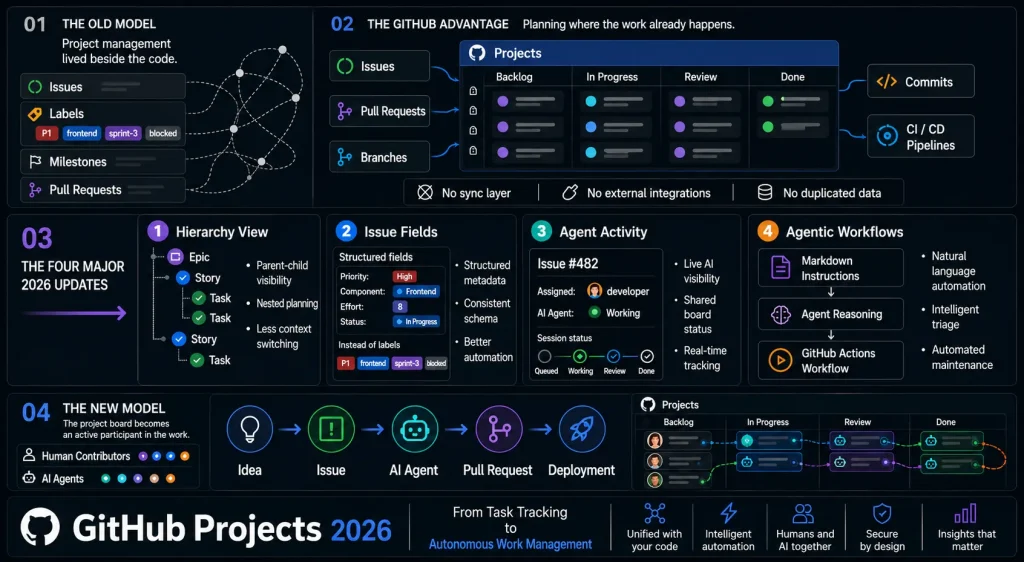
At its core, GitHub Projects is a planning tool that lives inside your GitHub repositories and organisations. Unlike external tools such as Jira, Linear, or Asana, it has direct access to your pull requests, issues, branches, commits, and CI pipelines. There’s no sync layer, no webhook dance, no data living in two places at once.
That integration has always been its theoretical advantage. The problem, until recently, was that the product’s feature depth didn’t justify switching over from dedicated project management tools. That’s changed in 2026.
Hierarchy View: Seeing the Full Picture
In January 2026, GitHub introduced Hierarchy View for Projects in public preview. By March 19th, it reached general availability, enabled by default for all new project views.
The premise is simple and long overdue: you can now see your full issue hierarchy directly inside project table views. Sub-issues cascade beneath their parents. Epics, user stories, tasks, they all nest cleanly in one surface, without leaving the board.
Before this, engineering teams working in GitHub had to mentally reconstruct hierarchy from labels, milestones, and linked issues. It worked, roughly, but it meant context-switching and a kind of topology guesswork that slowed planning down. You knew the shape of your work existed somewhere; you just couldn’t see it.
The March update added sub-issue filtering using standard query syntax, improved drag-and-drop reordering within hierarchies, and file upload support in issue forms. These feel like table-stakes refinements, but they’re the kind of thing that separates a feature you demo from one you actually depend on.
“Hierarchy view is the missing piece. I’ve tried everything, workflows, browser extensions and nothing gave me real hierarchy until now.” — GitHub Community member, 2026
Issue Fields: Replacing the Label Spaghetti
On March 12th, GitHub shipped Issue Fields into public preview. By May 21st, with over 1,000 organisations already using it in preview, the feature went broadly available for all organisations.
The idea: instead of a flat pile of labels (P1, frontend, needs-review, blocked, sprint-3), you can now define structured metadata directly on issues. Custom fields. Typed values. Queryable schemas that work consistently across repositories, across teams, across bots and integrations.
Early adopters describe it as the missing link between issues and projects. Teams are replacing their label systems, unifying priority and effort tracking across hundreds of repositories, and building automations that have a consistent schema to build on, rather than parsing label strings.
The REST API now supports setting field values when creating issues, matching existing GraphQL parity. Organisations can also control which fields are visible to non-members in public repositories, like a sensible enterprise touch that prevents internal metadata leakage.
Agent Activity in Issues and Projects: The Board That Watches Itself
This is the update that changes something fundamental. On March 26, 2026, GitHub shipped agent activity visibility for Issues and Projects, and it’s now generally available for all repositories with access to coding agents.
Here’s what it means in practice: when a coding agents like GitHub Copilot, Claude, or Codex are assigned to an issue, its session now appears directly under the assignee in the sidebar. Live status indicators show whether the agent is queued, working, waiting for review, or completed. Click the session, and you jump straight into the logs.
In project table and board views, you can turn on Show Agent Sessions to see, at a glance, which items have active agent work attached, and how that work is progressing across the full body of work. In April, GitHub extended this to Visual Studio, letting developers launch and steer cloud agent sessions directly from the IDE.
That sounds small until you realise what it implies. Your project board is no longer just a record of human commitments. It’s a live surface that also shows machine work, in the same column, with the same status vocabulary, alongside the same issues your engineers are tracking. That’s a meaningful shift in how teams will think about task assignment.
Your project board is no longer just a record of human commitments. It’s a live surface that also shows machine work, in the same column, with the same status vocabulary.
Agentic Workflows: Automation That Can Think
On February 13, 2026, GitHub shipped GitHub Agentic Workflows into technical preview, a collaboration between GitHub Next, Microsoft Research, and Azure Core Upstream, released open source under the MIT licence.
The premise is a genuine paradigm shift: instead of writing automation in YAML, you write it in plain Markdown. Natural language. You describe what you want, and the AI agent figures out how to do it.
Drop a Markdown file into ‘.github/workflows/’. The `gh aw` CLI compiles it into a standard GitHub Actions workflow. The agent then handles the logic, triaging incoming issues, investigating CI failures, reviewing pull requests, maintaining documentation, and monitoring compliance.
Security is built in from the start: workflows run read-only by default, with sandboxed execution, network isolation, SHA-pinned dependencies, and sanitised write operations through preapproved ‘safe outputs‘. Multiple coding agents are supported, GitHub Copilot CLI by default, but the same workflow format runs across engines.
The practical implication: a team could write a Markdown file that says “triage incoming issues by severity and assign to the right team lead based on component”, and that behaviour would run as a scheduled workflow without anyone writing a single line of imperative logic. The agent handles the decision-making.
Write workflows in plain Markdown instead of complex YAML, and let AI handle intelligent decision-making for issue triage, pull request reviews, CI failure analysis, and repository maintenance.
How Teams Are Using This in Practice
The updates don’t exist in isolation; they compose into workflows that, twelve months ago, would have required multiple tools, manual syncing, and considerable toil.
A mid-sized engineering team might now operate like this:
- Issues are created with structured fields, priority, component, and effort estimate, set either manually or by a GitHub Action on ingestion.
- The hierarchy view maps epics to stories to tasks in a single project table, updated automatically as sub-issues change state.
- A Copilot cloud agent is assigned to routine issues, dependency updates, test coverage gaps, and documentation drift, and its live status appears directly in the project board.
- An Agentic Workflow triages new issues nightly, labels them, assigns component owners, and flags anything that looks like a regression based on recent CI data.
- Release information surfaces in the issue sidebar, giving engineers context on what’s shipped and what hasn’t without leaving the ticket.
The result is a project board that actively participates in the work, rather than passively recording it. Engineering managers get real-time visibility without asking for status updates. Developers get context without context-switching. Automation handles the cognitive overhead of coordination.
For larger enterprises, Issue Fields with REST API parity means existing tooling, bots, integrations, and internal dashboards, which can now read and write structured metadata programmatically, with a consistent schema across every repository in the organisation. The most common early pattern: replacing a sprawling label taxonomy with typed, queryable fields that don’t require human memory to maintain correctly.
What This Shift Actually Represents
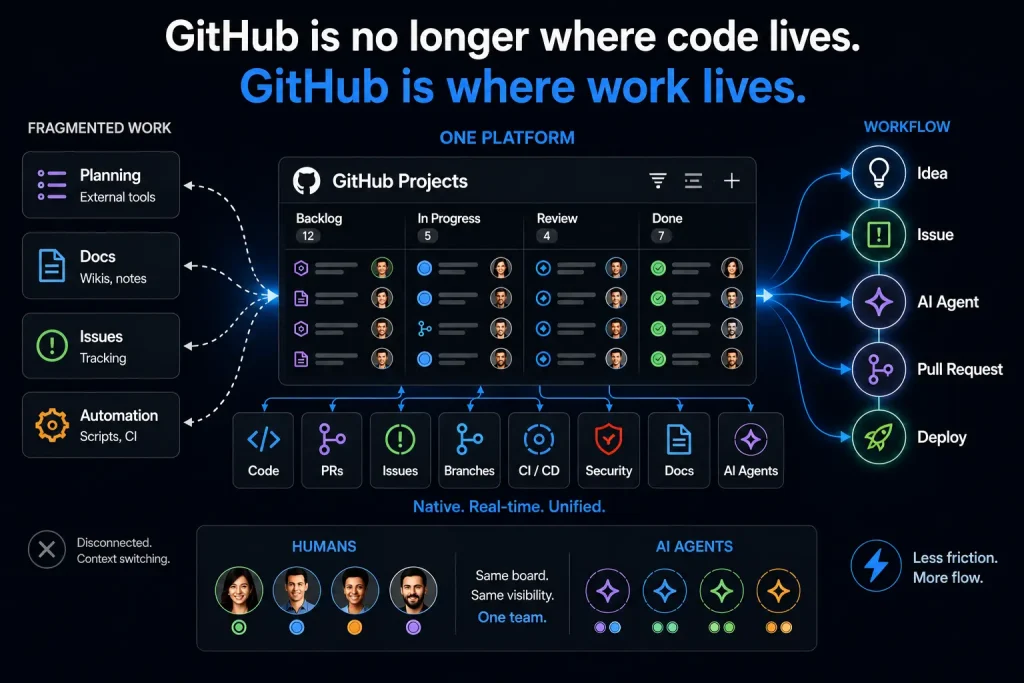
GitHub has always been where code lives. What 2026 is clarifying is that GitHub now wants to be where work lives, all of it, including the parts that AI agents handle.
For years, the dominant pattern was: GitHub for code, some other tool for planning. The argument against GitHub Projects was always the same: it lacked the depth of Jira, the elegance of Linear, and the flexibility of Notion. Those criticisms still had teeth in 2024. They’re weakening in 2026. Not because GitHub Projects has matched those tools feature-for-feature, but because the integration advantage is compounding. When your planning tool has native access to your codebase, your CI pipeline, your security alerts, and your AI coding agents, the value of that integration starts to outweigh gaps in formatting or reporting.
There’s a deeper shift here, too. The introduction of agent sessions in project views isn’t just a UI feature. It’s a conceptual acknowledgement that AI agents are team members, entities that can hold tasks, report status, and be tracked like any other contributor. That framing will have implications far beyond GitHub’s own tooling.
The pipeline from idea → issue → agent session → pull request → deployment is getting shorter. The number of manual handoffs in that chain is shrinking. GitHub Projects, in 2026, is the surface where that compression becomes visible.
The introduction of agent sessions in project views is a conceptual acknowledgement that AI agents are team members and entities that can hold tasks, report status, and be tracked like any other contributor.
Key Takeaways
- Hierarchy View : Full parent-child issue visibility in project tables. Now on by default for new views. Replaces the mental overhead of reconstructing structure from labels and milestones.
- Issue Fields : Structured, typed metadata on issues, queryable across repositories. Over 1,000 organisations adopted it within weeks of preview. Replaces flat label systems with a consistent schema.
- Agent Activity in Issues and Projects: Coding agents (Copilot, Claude, Codex) can be assigned to issues. Their session status, which is queued, working, in review, or done, appears live in the project board and issue sidebar.
- GitHub Agentic Workflows : Write repository automation in plain Markdown. AI handles the logic. Read-only by default, open source, and composable with any coding agent.
- The integration advantage is compounding: GitHub Projects is gaining on standalone tools, not by matching features, but by leveraging the fact that code, issues, CI, and AI agents now live in the same platform.
- AI agents are being modelled as team members: Project boards now surface machine work alongside human work, in the same vocabulary. That’s a meaningful shift in how teams will think about task assignment and accountability.
Conclusion
There’s a version of the future where a software team’s project board is mostly self-maintaining. Where issues triage themselves, agents report their own status, hierarchies stay coherent without manual effort, and structured metadata moves through your toolchain without anyone copying it from one field to another.
That future isn’t here yet. But the 2026 updates to GitHub Projects are the clearest signal yet that someone is building seriously toward it, not as a vision document, but as shipped features, changelog entries, and general availability announcements.
The question for engineering teams isn’t whether this direction is happening. It clearly is. The question is how quickly the mental model of project management changes to accommodate it. When an AI agent and a human engineer can share a board with equal legitimacy, same columns, same status and same accountability, what does that mean for how teams are structured, how estimates are made, and how work gets owned?
