

You log in. You’re verified.
The website trusts you now. But what if someone else steps in, right after that moment of trust and quietly becomes you?
Most people think hacking means stealing passwords.
In reality, a skilled attacker doesn’t always need yours.
They need to show up at the right moment, after you’ve already proven who you are.
That’s the quiet danger of session hijacking.
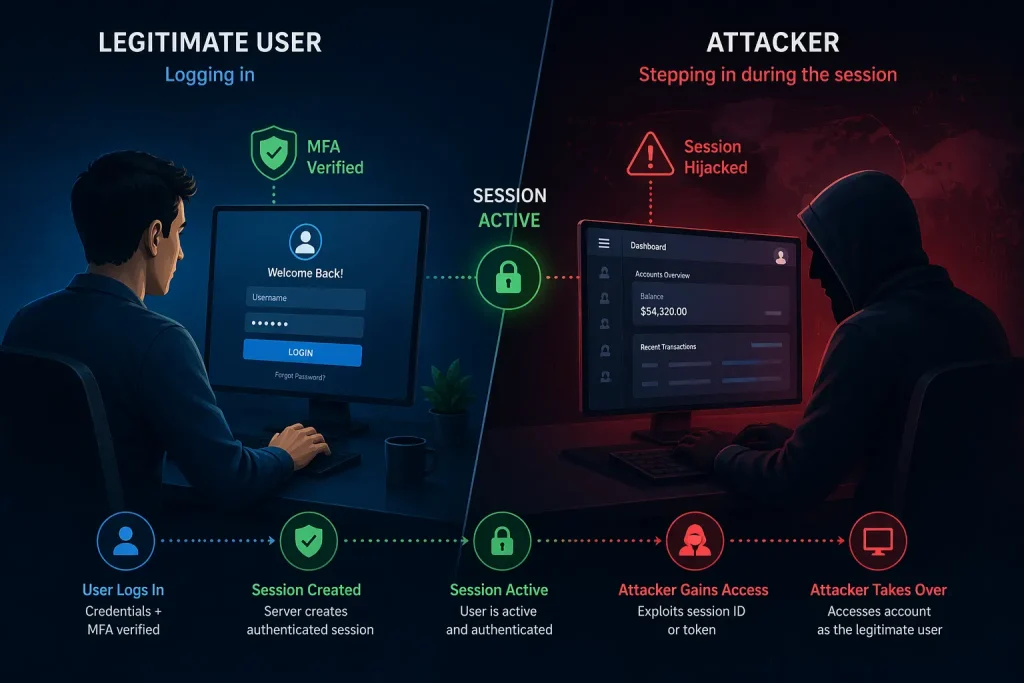
Source: AI-Generated
What Is a Session, Anyway?
Every time you log into a website, the server needs a way to remember you, because websites are stateless by nature.
So it issues you a session token: a unique, temporary string of characters stored as a cookie in your browser.
Think of it like a wristband at a concert. You show your ID once at the gate, get the band, and from that point on, no one checks your ID again. They look at the band.
The session token is that wristband. And like a wristband, if someone else gets it, they get in.
How Session Hijacking Actually Works
In a session hijacking attack, an attacker steals or predicts a valid session token to impersonate a legitimate user, gaining full, unauthorised access to their active web session.
No credentials needed. No brute-force required.
Common methods include:
- Packet sniffing: On unsecured networks (think public Wi-Fi), attackers intercept unencrypted traffic to capture your session cookie in transit.
- Cross-Site Scripting (XSS): Malicious scripts injected into a webpage can silently extract your cookie and send it to the attacker’s server.
- Man-in-the-Middle (MitM) attacks: The attacker positions themselves between you and the server, quietly reading everything that passes through.
- Session fixation: A less obvious but equally dangerous variant, the attacker assigns you a session ID before you log in, then waits for your login to validate it.
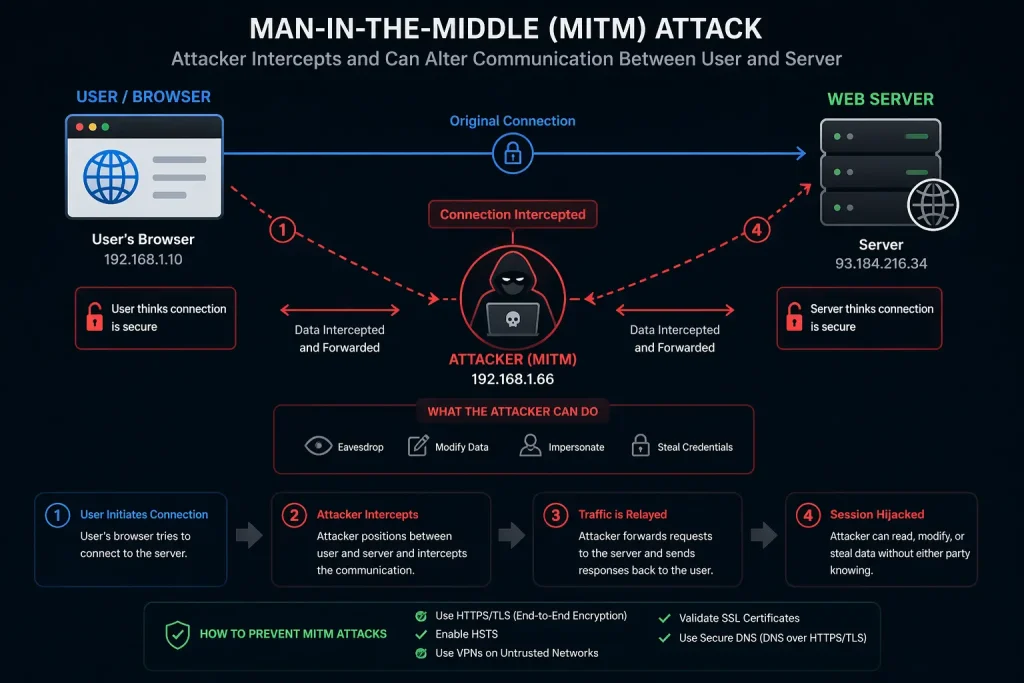
Source: AI-Generated
What Happens After a Session Gets Hijacked?
Here’s what most people don’t notice: the attack is silent.
You’re still logged in on your device. Everything looks normal.
Meanwhile, the attacker, using your stolen session cookie, can read your messages, make purchases, export your data, or escalate access within a platform.
It’s not a smash-and-grab. It’s someone sitting quietly in your chair while you think you’re still the only one in the room.
Insight Layer
The real danger isn’t just the data stolen, it’s that traditional security layers like two-factor authentication don’t protect an active session. The attacker already got past the gate.
How to Stay Protected
For users: always use HTTPS connections, log out of sessions you’re not using, and avoid sensitive accounts on public Wi-Fi without a VPN.
For developers: implement secure, HttpOnly, and SameSite cookie flags. Regenerate session tokens after login. Set short session expiry times. Validate requests with CSRF tokens. And always sanitise user input to block XSS attacks, one of the most common paths to cookie theft.
Security isn’t about building one giant wall. It’s about making every step of the journey harder for an attacker to exploit.
Key Takeaways
- Session hijacking steals access, not credentials. The attacker uses your token, not your password.
- It can happen through XSS, packet sniffing, MitM attacks, or session fixation.
- Once a session token is stolen, the server trusts the attacker as you, fully.
- Secure cookie flags, HTTPS, and session token regeneration are your frontline defenses.
- The attack is usually invisible, which is exactly what makes it dangerous.
Closing Thought
We spend a lot of energy protecting the front door, strong passwords, two-factor authentication, and biometrics. And those matter.
But session hijacking reminds us that the door isn’t the only way in.
Sometimes the attacker simply waits until you’ve opened it yourself and follows you through.
The question isn’t just “how strong is your password?”
It’s, what happens to your trust after the login?
