


Here’s the quiet irony of running a home lab: you start because you want to learn how things work. But somewhere around the third tool you install to manage the second tool you installed to watch the first tool, you’re spending more time maintaining your management stack than actually building anything. Portainer for containers. Uptime Kuma for monitoring. Cockpit for system visibility. Ansible for automation. Each solves a real problem. Together, they become a second full-time job.
WolfStack was built to break that cycle. And in 2026, it’s making a serious case that it can.
What Is WolfStack?
WolfStack is an open-source, unified server management platform built by Wolf Software Systems Ltd, a UK-based company that writes its tools in Rust. That language choice is deliberate: speed, memory safety, and minimal overhead. This isn’t a dashboard bolted together over a weekend.
The pitch is direct: WolfStack folds the functionality of Portainer, Uptime Kuma, Ansible, and Cockpit into a single deployable binary, no external database, no container runtime requirement and no layers of configuration to maintain. Install it once. Everything follows.
In June 2026, Brandon Lee at Virtualisation Howto put it through its paces on an Ubuntu Server 26.04 VM inside Proxmox.
His finding: this is likely the fastest, cleanest path to a functional home lab that currently exists.
The Origin of WolfStack
WolfStack began as the flagship project of Wolf Software Systems Ltd, operating under wolf.uk.com. The company’s stated mission is to make server management accessible to everyone, from home lab hobbyists to enterprise teams.
It launched as an open-source project under the MIT licence: free to use, modify, and distribute. The business model is community-first, a free tier for personal use, with Pro, Business, and Enterprise tiers adding clustering, SSO, white-labelling, and SLA commitments. Development is funded primarily through community Patreon support, with enterprise contracts for larger organisations.
What started as a control panel concept has since grown into a full ecosystem. Alongside WolfStack, the company has built WolfNet (encrypted mesh networking), WolfFlow (visual automation), WolfScale (database replication), WolfProxy, and WolfDisk, each integrating cleanly with the core platform.
The Architecture
The entire install is one command. The verified working URL, not the wolfstack.org/setup.sh link, which returns a web page, is:

The Single Binary Model
Most management dashboards are themselves infrastructure projects. They arrive as Docker Compose files with half a dozen containers, a web frontend, an API service, a worker, a database, and a cache. You have to manage the tool that manages your tools. WolfStack’s single binary model eliminates that entire class of problems. One process, one file, one service to monitor. If something goes wrong, there’s exactly one place to look.
Being written in Rust compounds this benefit. Rust programs are compiled to native binaries with no runtime dependency, no JVM, no Python interpreter, and no Node.js. The memory footprint is low and predictable. On modest home lab hardware running 24/7, that matters more than benchmark numbers suggest.
Peer-to-Peer Multi-Node Architecture
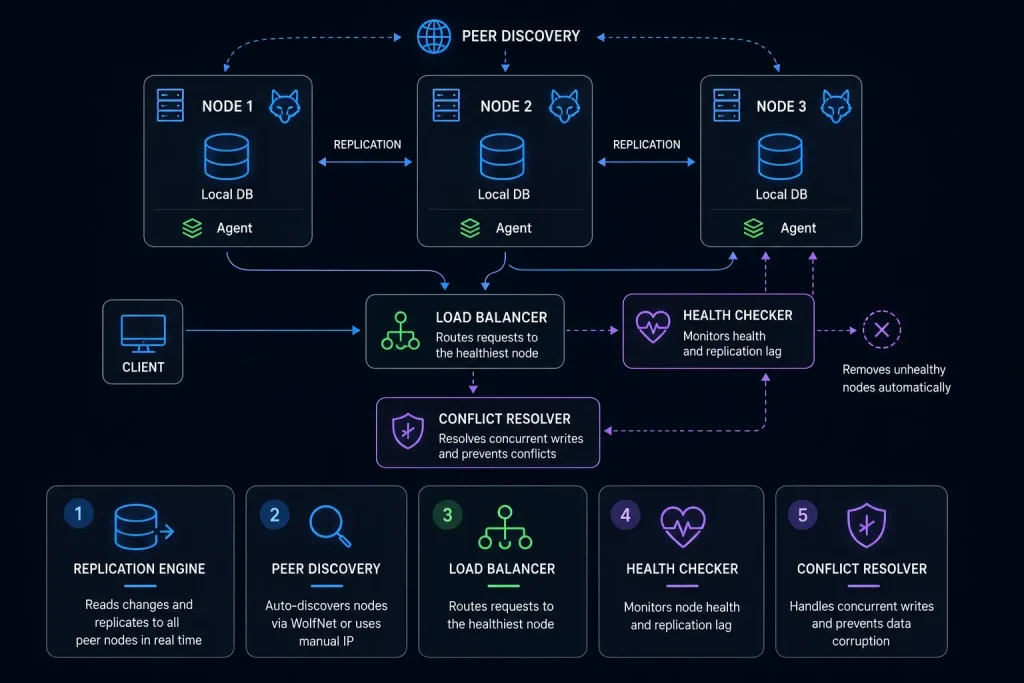
For single-machine setups, WolfStack is self-contained. For multi-node environments, it uses a peer-to-peer architecture powered by the WolfScale replication engine. Each node manages its own local database and synchronises changes with peers automatically. The key components work together:
- Replication Engine: reads binlog events from the local database and forwards them to all peer nodes in real time.
- Peer Discovery: auto-discovers other WolfStack nodes via WolfNet, or accepts manual IP configuration for environments without broadcast networking.
- Load Balancer: routes incoming queries to the healthiest available node, preventing any single node from becoming a bottleneck.
- Health Checker: continuously monitors node liveness and replication lag, removing unhealthy nodes from rotation automatically.
- Conflict Resolver: handles concurrent writes to the same rows across multiple nodes, critical for preventing data corruption in active multi-node clusters.
In practice, this means you can add a new server to your WolfStack cluster with a single click from the dashboard. Real-time metrics, container migration between nodes, and automatic peer discovery are all part of the default cluster experience, not enterprise add-ons.
The Management Layer Model
The most important architectural decision WolfStack makes is also the most understated one: it positions itself as a management layer, not a replacement for anything you’re already running.
Install it on a Proxmox VE node, and it adopts your existing VMs, LXC containers, and storage volumes, presenting them in the WolfStack dashboard alongside any Docker containers it manages. Your Proxmox config is untouched. Your existing LXCs keep running exactly as before. WolfStack just adds a better interface on top, plus Docker management, unified backups, and cluster-wide networking.
The same logic applies to bare-metal servers, Docker hosts, and Kubernetes clusters. WolfStack wraps around what’s there rather than displacing it. This non-destructive adoption model is arguably the most important reason teams try it, because the answer to “do I have to rebuild my lab to use this?” is simply: No.
Security Model
WolfStack’s security defaults are sensible for home lab use and scalable for production. Two-factor authentication is built in. Users and roles are managed from the dashboard. The WireGuard bridge (available in Pro tier and above) provides encrypted tunnels between nodes for teams managing servers across different physical locations. TLS certificates are handled automatically, so the dashboard itself never runs unencrypted on a network interface.
For organisations that need it, the Enterprise tier adds OIDC/SSO integration, plugging WolfStack into existing identity providers like Okta, Azure AD, or Google Workspace. That’s a meaningful bridge between home lab tooling and the kind of access control enterprises actually require.
WolfStack doesn’t replace your server. It doesn’t lock you in. It’s a friendlier front door to a machine you already own.
How to Use WolfStack
Once installed, you get a dashboard that covers significantly more ground than its single-binary pitch suggests.
App Store, 530+ one-click applications: Media (Plex, Jellyfin, Sonarr), dev tools (GitLab, Gitea, Jenkins), AI/ML (Ollama, Stable Diffusion, ComfyUI), and home automation (Home Assistant, Node-RED, Pi-hole), all pre-configured, deployed as Docker, LXC, or bare metal with sidecar databases.
WolfFlow automation: A visual workflow engine with 16 action types and conditional branching. Build scheduled backups, automated restarts, and multi-step provisioning sequences, no YAML required.
Monitoring and status pages: Built-in public status pages with 90-day uptime history and alerting. No separate Uptime Kuma instance needed.
WolfNet mesh VPN: Encrypted private networking between all your servers, integrated, not bolted on.
AI operations agent: Connect Claude, Gemini, or a local Ollama model. The newer WolfAgents feature adds named agents with persistent memory that can email, schedule tasks, and act on your cluster through Discord, Telegram, or WhatsApp, within scoped permissions.
Why WolfStack Stands Out
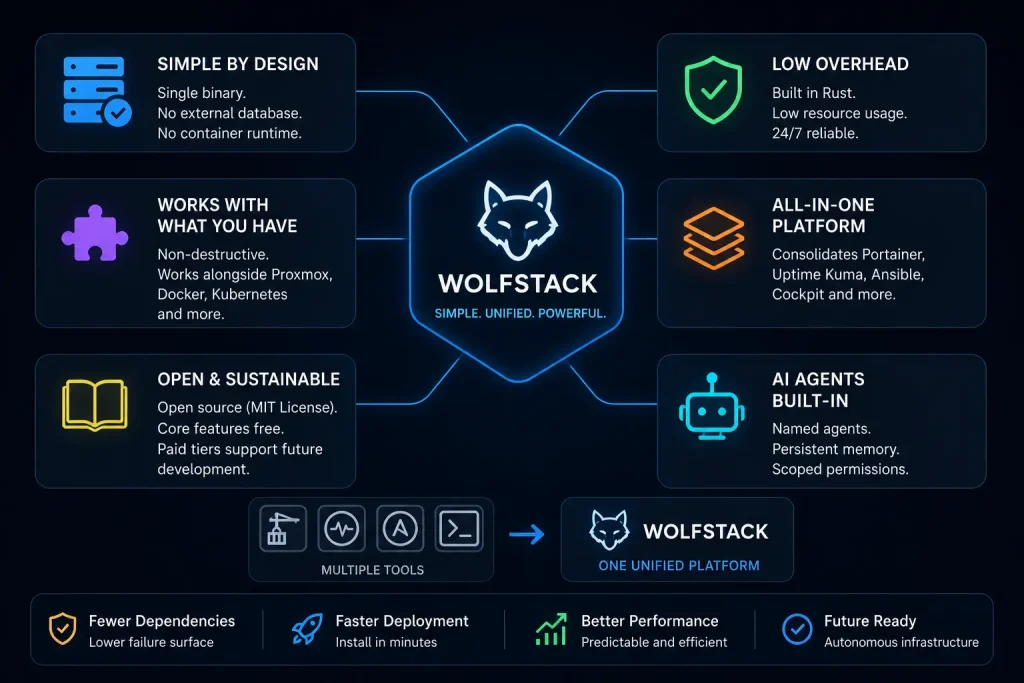
It also delivers genuine consolidation by combining capabilities typically spread across separate tools such as Portainer, Uptime Kuma, Ansible, and Cockpit into a single unified platform. Built in Rust, WolfStack benefits from low resource consumption, predictable performance, and long-term reliability, making it particularly well-suited for always-on home lab environments running on modest hardware.
The platform remains open source under the MIT license while supporting sustainable development through optional paid tiers, ensuring that core functionality remains freely available. Perhaps most notably, WolfStack treats AI agents as first-class infrastructure components, allowing users to deploy named agents with persistent memory and scoped permissions. This approach points toward a future where infrastructure management becomes increasingly autonomous, with AI systems capable of monitoring, coordinating, and acting within defined operational boundaries.
Key Takeaways
- One command installs everything: Use the GitHub raw URL, not wolfstack.org/setup.sh.
- Runs on most Linux platforms: Including Proxmox VE directly and Raspberry Pi.
- 530+ pre-configured apps: Deployed as Docker, LXC, or bare metal, no YAML hand-editing.
- Replaces four tools in one: Portainer, Uptime Kuma, Ansible, Cockpit.
- Management layer, not a replacement: Adopts existing Proxmox, Docker, and Kubernetes setups without migration.
- AI agents built in: Claude, Gemini, or local models via Ollama, with persistent memory and cluster permissions.
- MIT licence, free up to 3 hosts: Community-funded, enterprise contracts available.
Conclusion
There’s a question worth sitting with after exploring WolfStack: why did this take so long?
The home lab community has been glueing together separate tools for years, not because separate tools are better, but because no single platform was ambitious enough to cover the ground. WolfStack changes that equation. It’s not perfect, and the AI agents are early-stage, but the direction is exactly right.
A single binary. One install command. 530+ apps. Visual automation. Mesh VPN. AI agents with memory. Running alongside, everything you’ve already built. That’s not a toy dashboard.
The real question isn’t whether WolfStack is fully ready today. It’s whether the community will invest in making it the platform it clearly wants to be. Based on 2026 so far, that investment is well underway.
